
Financial dates explained
Every transaction in Nexsyis has two dates: the date it happened and the date it posts to the general ledger. This page explains how Nexsyis sets each one, so you know which month a transaction will land in.
Transaction date and GL date
Section titled “Transaction date and GL date”- Transaction date is when the event happened. It’s the starting point for every transaction.
- GL date is when the transaction posts to the general ledger.
The GL date is the same as the transaction date, unless that period is closed. If the period is closed, the GL date is set to the first day of the first open period. The transaction date is kept, so you can still see when the transaction really happened.
For example, if a January invoice is entered on May 15 and January is closed, its GL date is May 1 (for a period of May 1 to May 31).
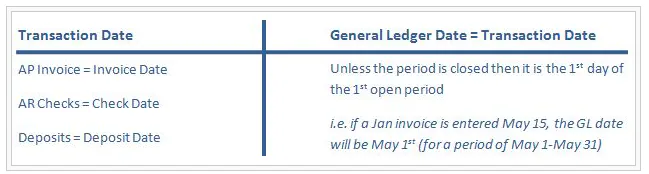
| Transaction | Transaction date |
|---|---|
| AP invoice | Invoice date |
| AR check | Check date |
| Deposit | Deposit date |
Nothing ever posts earlier than its transaction date. Nexsyis doesn’t backdate transactions into an earlier period.
To move an AP invoice back to its original period, see Move an AP invoice to its original financial period.
Sales: Completed or Delivered
Section titled “Sales: Completed or Delivered”Your company chooses whether the sales financial date is based on the Completed date or the Delivered date. This is a company-wide setting, decided when Nexsyis is set up, and it controls the dates Nexsyis gives sales and cost of sales transactions.
Folder invoice date
Section titled “Folder invoice date”A folder is invoiced when you deliver the vehicle or invoice the estimate. At that time, Nexsyis records the folder invoice date.
Folder financial date
Section titled “Folder financial date”Nexsyis also sets a folder financial date. Some screens label it Sales / Cost of Sales Date.
- By default, the folder financial date matches the folder invoice date.
- If the period is closed when the invoice is created, the folder financial date is set to the first day of the next open period.
Later invoices on the same folder
Section titled “Later invoices on the same folder”Any new invoice on the folder, for example after a supplement, uses the original folder invoice date as its invoice date. The AR invoice GL date follows the usual rule: it matches the invoice date, unless that period is closed, in which case it’s the first day of the next open period.
How this affects sales reports
Section titled “How this affects sales reports”A sales report can include folders that were completed or delivered in an earlier date range but had a supplement added after that month was closed. In that case, only the net difference from the supplement is recorded in the reporting period you select.
For example, a folder is invoiced for $7,000 on January 29. A $1,000 supplement arrives on February 15, after January is closed. Nexsyis reverses the original invoice and posts the corrected one on February 1. January keeps the $7,000, and February shows the extra $1,000.
Accounts payable and cost of sales
Section titled “Accounts payable and cost of sales”AP invoices should be dated by the vendor for when the work was done or the parts shipped. Invoices for a repair are normally dated on or before the date the vehicle was completed, so they post to cost of sales on the completion date. An invoice dated after the repair was completed usually relates to added costs or a vehicle return.
When an AP invoice is on a folder:
- On the invoice date, Nexsyis debits Inventory and credits AP.
- When the folder is invoiced, Nexsyis moves the cost to cost of sales on the folder’s financial date (completed or delivered): it debits Cost of Goods Sold and credits Inventory.
Invoices entered after a vehicle is completed aren’t backdated.
AR deposits
Section titled “AR deposits”AR deposits post on the deposit date, not the date on the customer’s check. AR financial reports use the deposit date. AR management screens use the date the check was entered. Because of this, keep your undeposited payments up to date.
Non-AR payments
Section titled “Non-AR payments”A preference setting decides whether non-AR payments post on the check date or the deposit date.
Non-AR payments post as two transactions:
- On the check date: debit Undeposited Payments, credit the income statement account.
- On the deposit date: debit Cash, credit Undeposited Payments.