
Set up labor flag events
By default, all labor types are flagged when the Repairs are Complete date is set on the folder. Labor flag events let you flag part of a labor type earlier, when the folder completes a particular repair stage.
Set a flag event
Section titled “Set a flag event”- Open System › Setup › Production › Labor Flag Events.
- Select the arrow next to the labor type to see its stages.
- Double-click the stage that should flag labor.
- In Event Percent, type the percent as a decimal. For example, type 0.8 for 80%.
- Select Update.
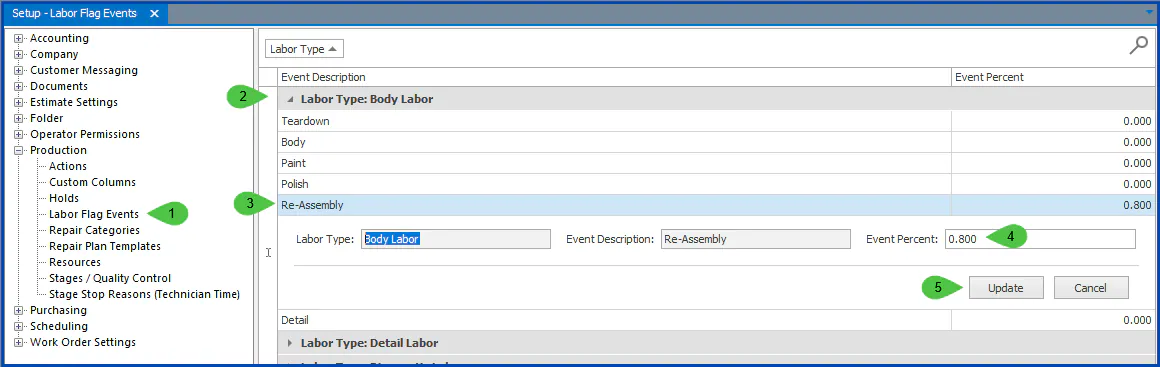
In this example, 80% of Body Labor is flagged when the folder completes Re-Assembly. The remaining labor is flagged when the Repairs are Complete date is set on the folder.
Flag the remaining labor at a later stage
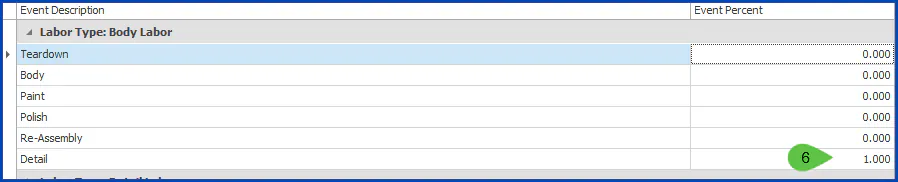
Section titled “Flag the remaining labor at a later stage”To flag the remaining labor at a later stage instead of when the repair is complete, set that stage to 1.0 (100%).
For example, set Detail to 1.000 to flag all the remaining Body Labor when Detail is complete.
Repeat these steps for each other labor type.