Skip to content
Nexsyis Collision Help
Search
Ctrl
K
Cancel
Menu
New Feature Updates
All feature updates
Paint Materials exception and courtesy cars
Assignments for FNOL
Shop supplies integration and sending videos
Payment screen updates
NexsyisNow web app logo
Feedback and review routing
NexsyisNow PBS screen
NexsyisNow folder notes and favorites
Reporting update
Training webinars for March
Getting Started
How a repair moves through Nexsyis
Review
Find your way around Nexsyis
Review
Search, filter and save grid views
Review
Glossary
Review
Get help from Nexsyis Support
Review
Folders
Folder basics
Folder overview
Find a folder
View archived folders
Create a folder
Create a folder from an estimate file
Edit customer and vehicle details
Add a fleet vehicle to a folder
Set the repair category
Set the target date
Add notes to a folder
Transfer a folder to another location
Mark a folder as a lost opportunity
Handle a total loss
View a folder's audit log
Check-in to delivery
Check in a customer
Check in a vehicle with e-Vehicle Check-In
Mark a vehicle as arrived
Mark a vehicle as complete
Prepare a folder for delivery
Mark a folder as final reviewed
Mark a vehicle as delivered
Completed date vs delivered date for sales
Change completed or delivered dates
Reopen a delivered folder
Record a vehicle return
Documents, photos and videos
Attach documents to a folder
Add photos to a folder
Add videos to a folder
Print from a folder
Email from a folder
Claims, rentals and services
Insurance assignments overview
Process an assignment
Manage rentals
Request a Hertz rental and send repair updates
Manage courtesy cars
Create a tow request
Request a diagnostic scan
Handle shop pay (internal) repairs
Folder settings
Use manual folder numbers
Set up folder print packages
Set up courtesy cars
Set up tow companies
Set up referral sources
Estimates & Work Orders
Estimates
Estimates and work orders explained
Import an estimate
Import a revised estimate (supplement)
Write a Nexsyis estimate
Print an estimate
Sales tax on estimates
Work orders
Create a work order
View a work order
Add manual work order lines
Convert work order labor lines
Print a work order
Use the Payment Breakdown Sheet (PBS)
Invoicing a repair
Invoice a folder
Create a pre-delivery invoice
Add a discount to a folder
Reverse an invoice and re-invoice
Estimate and work order settings
Set up Nexsyis estimate items
Set up Nexsyis estimate tasks
Set up Nexsyis estimate attributes
Map estimate insurance companies
Set an operator's EMS path
Set up automatic line conversion rules
Set work order line conversion options
Set work order print preferences
Production & Labor
Vehicle Center
Vehicle Center overview
Use the In Process list
Customize In Process columns and views
Filter and sort the In Process list
Change a vehicle's stage
Set technician priorities and print production lists
Track a folder's progress
Work the Opportunities tab
Work the Scheduled Drops tab
Put a vehicle on hold
Set up Vehicle Center custom columns
Fix the wrong default location
Repair plans
Repair plan overview
Edit a vehicle's repair plan
View the repair timeline
Set up repair plan stages
Set up repair plan templates
Repair plan behavior settings
Quality control
Complete a quality control check
Attach photos to a QC check
Review
View QC history and reports
Set up quality control
Review
Labor allocation
Allocate labor
Review
Assign technicians to repair stages
Review weekly flag labor
Review
Set up labor resources
Review
Set up technician teams
Set up labor flag events
Review
Technician time
Technician time overview
Review
Clock in and out of repairs
Review
View technician punches
Correct technician punches
Review
Set up technician time and Technician Clock
Review
Scheduling
Scheduling screen overview
Review
Create an appointment
Review
Reschedule an appointment
Review
Cancel an appointment
Review
Add or remove appointment slots
Block time when a resource is unavailable
Review
Take appointments online
Settings
Set up scheduling
Set up appointment types
Review
Set up resource-based appointments
Review
Set up the slot schedule
Review
Set up online appointment scheduling
Set up holidays
Review
Parts & Purchasing
Ordering parts
Purchase Assistant overview
Pre-order parts
Order parts
Review
Add a purchase line
Create a manual purchase order
Source parts from vendors
Review
Send a PO to a vendor
Review
Change a PO's quantity or vendor
Review
Set expected delivery on a PO
Handle back-ordered parts
Close a purchase order
View a PO line's audit log
Special purchase lines
Add a core charge
Review
Use stock items
Flag critical purchases
Use standard purchase codes
Use the Hat No field
Record a trade for services
Review
Record a parts labor credit
Receiving
Receive parts
Review
Receive a part that wasn't ordered
Receive more than was ordered
Print the missing parts report
Print parts labels
Rejects and returns
Reject a part
Review
Reject a part with no PO number
Review
Return a part
Undo a return
Print return documents
Attach parts return slips
Review
Pricing and vendors
Match OEM prices on aftermarket parts
Monitor purchase price differences
Review
Manage company contacts
Manage vendor contacts
Merge duplicate vendors
Review
Part numbers don't show in the Purchase Assistant
Parts ordering integrations
Order through CollisionLink
Review
Order and invoice through OPS Trax
Review
Order through PartsTrader
Review
Map third-party vendors
Review
Troubleshoot third-party orders
Customer Communication
Communicating with customers
Customer communication overview
Review
Text customers
Review
View attachments from customers
Send photos and videos to customers
Send an estimate for review
Get e-authorization from a customer
Collect signatures
Review
Online photo estimates
Create and complete follow-ups
Request feedback and reviews
Use the Call Center
Handle customer opt-outs
Team messaging and tasks
Message Center overview
Message your team
Review
Assign and complete tasks
Review
Post announcements
Review
Message partners
Review
Set up team messaging groups
Communication settings
Activate SMS for a location
Set up customer messaging templates
Review
Set up follow-up templates
Set up customer paperwork
Set up print documents and e-signing
Set customer web preferences
Set up the feedback and review link
Set up and use CSI surveys
Review
Accounting
Accounts payable
Accounts payable overview
Set up an AP vendor
Review
Store vendor documents
Invoice purchases
Review
Attach an invoice line to a PO line
Review
Enter an AP invoice manually
Import AP invoices
Review
Invoice parts automatically with PartBay
Review
Create an AP invoice from an existing one
Invoice several POs on one invoice
Invoice overhead expenses
Review
Invoice freight, restocking fees and discounts
Review
Invoice tow bills
Shop pay lines on AP invoices
Select a sales code on an AP invoice
Review
Invoice location vs. financial location
Post a credit memo
Apply two credit memos to one return line
Review
Edit a paid AP invoice
Move an AP invoice to its original financial period
Fix AP invoice import errors
Review
Paying vendors
Approve AP checks
Review
Print a check batch
Review
Enter a manual AP payment
Pay vendors by ACH
Review
Partially pay an AP invoice
Pay checks on delivery (COD)
Review
Pay AP invoices by credit card
Review
Pay a vendor before the PO exists
Review
Enter a payment for a vendor credit memo
Review
Reimburse an employee for an invoice
Review
Remove vendor credits from AP aging
Review
Apply a vendor credit to a folder's AR balance
Reconcile vendor statements
Process 1099s
Review
Third-party accounting: accounts payable
Set up check printing
Review
Accounts receivable
View a folder's AR
Review
Track outstanding AR
Review
Enter an AR payment
Review
Apply one payment across several folders
Split a payment between AR and non-AR
Review
Import AR payments
Review
Enter an EFT payment
Review
Track AR prepayments
Post a negative AR payment
Review
Make an AR adjustment
Review
Refund a customer
Review
Record a returned check
Review
Charge credit card fees
Print AR statements
Review
Set AR follow-up reminders
Review
Send a balance to a collection company
Turn on EFT
Review
Customer deposits and the month-end reclass
Review
Why AR aging doesn't match the GL
Review
Third-party accounting: deposits
Review
Card payments (Global Payments)
Card payments overview
Review
Take a card payment
Review
Send a payment request
Review
Void a card payment
Review
Refund a card payment
Review
View card batches
Review
Correct a duplicate charge
Set up a payment terminal
Review
Activate a new location
Card payments aren't posting
Banking and cash
Make a deposit
Review
Hold a payment from a deposit
Review
Record customer deposits
Review
Complete a credit card batch
Review
Record a non-AR payment
Review
Record petty cash
Record owner withdrawals
Review
Record a credit card payment before the statement import
Review
Create a positive pay file
Review
Import bank and credit card transactions
Review
Map a bank file
Review
Map banking transaction groups
Review
Reconcile a bank account
Review
Reconcile an account manually
Handle failed ACH transactions
Review
Fix a voided or misreconciled item
Review
Troubleshoot bank and credit card imports
Review
Why a credit card shows a positive balance
Review
Request a new bank account or credit card
Review
General ledger
Financial dates explained
Review
Look up GL detail
Review
Use the GL report map
Enter a journal entry
Import journal entries
Review
Set up recurring journal entries
Why a journal entry can't post to AR, AP or inventory
Review
Close the month
Review
Manage GL periods
Review
Close year vs. lock GL
Review
Why a change posted to the next month
Review
Post payroll to the general ledger
Review
Accrue payroll and labor inventory
Review
Set up payroll accruals
Review
Set up financial categories
Review
Set up sales codes and financial categories
Review
Request a new GL account or financial category
Review
Sales tax
View tax rates
Review
Run the sales tax report
Review
Why the sales tax report excludes AR adjustments
Review
Go-live for new shops
Set up accounting for a new shop
Review
Enter work-in-progress AP
Review
Enter work-in-progress AR
Review
Convert prior flag hours
Review
Set folder dates for WIP folders
Review
Remove a work order from an AR-only folder
Payroll: Time & Employees
Time
Track employee time in Nexsyis
Review
Use the time clock
Review
Approve time
Review
View and edit employee time
Review
Lock a punch to a specific work day
Reset an employee's time clock password
Review
Set up an employee to use the time clock
Set time and absence approval permissions
Review
Absence
Request and approve an absence
Review
Record an absence
Review
Use the absence calendar
Review
HR
Add a new employee
Review
Terminate an employee
Set employee pay rates
Reports & Analytics
Using reports
Run a report
Review
Save reports as favorites
Review
Subscribe to reports
Review
Edit email addresses on an alert or subscription
Add custom report footers
Review
Use Excel shell templates
Review
Set reporting permissions
Review
Manager and regional manager review guide
Review
Sales and operations reports
Choose the right Sales Analysis report
Review
Review sales by folder
Review
Track your capture rate
Review
Report cycle time in hours
Run the shop pay report
Run the customer communication report
Review
Accounting reports
Understand the AR aging
Review
View unpaid invoices by vendor due this month
Review
Analytics
Measure repair cycle time
Review
Review and resolve exceptions
Review
Analyze gross profit by company or location
Review
Analyze gross profit for a folder
Paint materials and mixing machine data
Review
Track projected sales against your goal
NexsyisNow dashboards
Use the Production dashboard
Review
Use the Sales dashboard
Use the Marketing dashboard
Use the AR dashboard
Show the production board in presentation mode
Review
NexsyisNow & Mobile App
NexsyisNow web app
NexsyisNow overview
Review
Add NexsyisNow to your phone's home screen
Review
NexsyisNow permissions
Review
Allow camera access
Review
Troubleshoot NexsyisNow
Nexsyis mobile app
Activate and log in to the mobile app
Review
Use your repair list
Review
Settings & Administration
Company and locations
Set up a location
Review
Set up insurance companies, agents and adjusters
Review
Add or change a fleet
Review
Set up vehicle make groups
Review
Set up adjustment reasons
Review
Set up status notifications
Review
Users and security
Add a user (operator)
Review
Reset a user's password
Set password rules
Review
Restrict NexsyisNow by IP address
Review
Reset the validation key
Review
Email setup
Set up email with Outlook
Review
Set up email with Gmail
Review
Create a Microsoft 365 app registration
Review
Troubleshoot email
Review
Document imaging
Document imaging options
Link documents
Review
Unlink a document
Add static folder documents
Review
Link and view AP invoice images
Review
Link voice and video files
Review
Set up the imaging menu and document names
Review
Set up document unlinked reasons
Review
Set an operator's imaging path
Installation and IT
Install Nexsyis
Install the Nexsyis services
Install the Nexsyis Dashboard
Review
Update Nexsyis
Review
Set up estimate imports
Review
Convert to CCC Secure Share imports
Review
Troubleshoot estimate imports
Printing setup and troubleshooting
Set your computer's regional date and time format
Don't pin Nexsyis to the taskbar
Review
Other integrations
Connect Body Shop Booster
Review
Review shop supplies invoices from NCS Log1c
Review
Create folders from Tractable estimates
Review
Training
Parts Course (interactive)
Privacy policy
Message partners
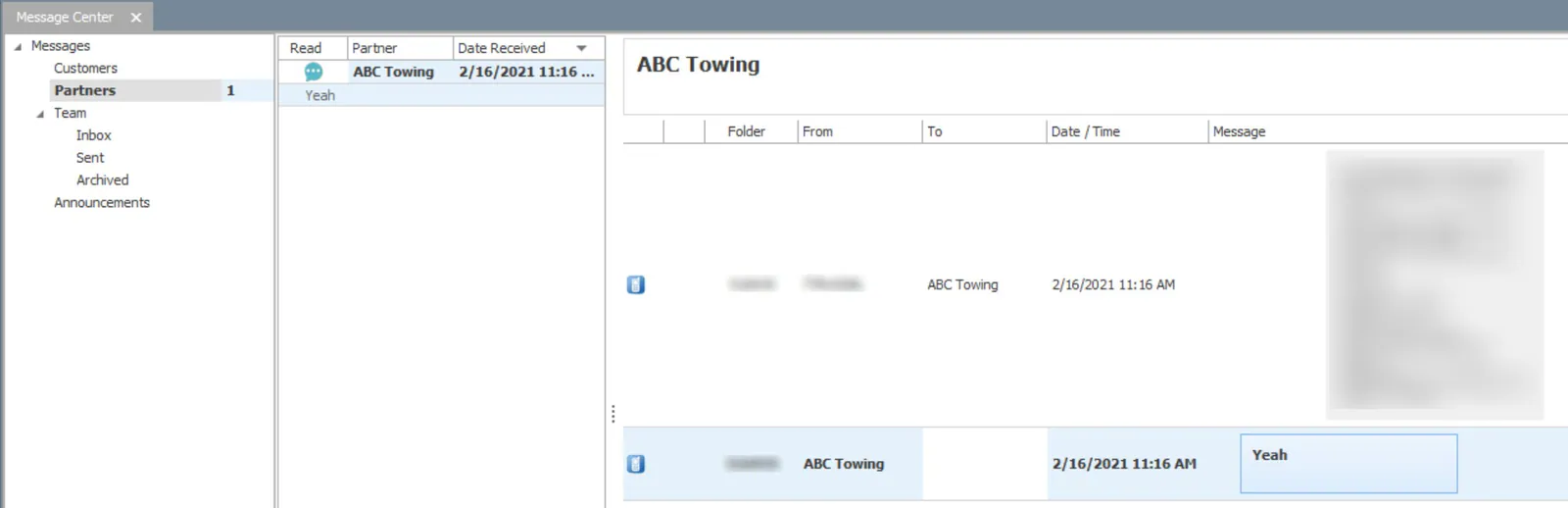
The
Partners
inbox in the Message Center shows texts sent to and received from tow request drivers.
Related articles
Section titled “Related articles”
Message Center overview