
Use Excel shell templates
An Excel shell template runs a Nexsyis report inside Excel. Enter the connection details and report parameters once, then refresh the report whenever you need current data.
Run a report from a template
Section titled “Run a report from a template”-
Open the Excel report and make sure all macros are enabled.
The report title fills in automatically in cell A1.
-
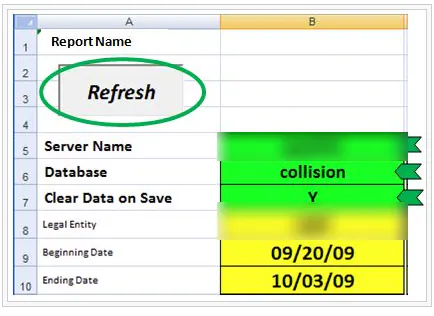
On the Parameters worksheet, enter your Server Name and Database in the green cells.
-
In the Clear Data on Save green cell, enter Y to clear all the report data automatically when you save the file, or N to keep it.
-
Enter any other parameters the report needs, for example a beginning and ending date.
-
Select Refresh to run the report. The Refresh button is always at the top of the report.
Save the updated reports on your network, in your reports or templates folder.