
Add a user (operator)
Give an employee a Nexsyis login by copying an existing user (operator) who does the same job. The new user gets all of that user’s permissions, which you can then adjust.
Before you begin
Section titled “Before you begin”- Set the person up as an employee first. See Add a new employee.
- You need access to Setup › Operator Permissions.
Create a user from an existing user
Section titled “Create a user from an existing user”-
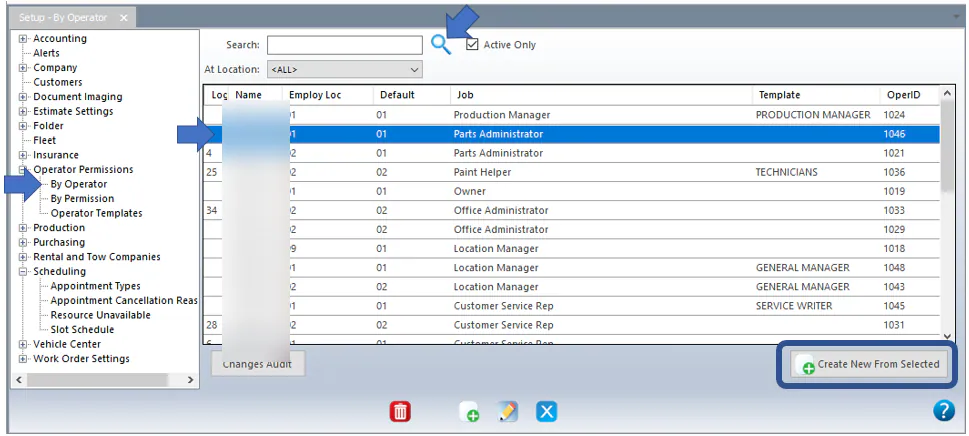
Open Setup › Operator Permissions › By Operator.
-
Select the Search icon to show all users.
-
Select the user whose permissions you want to copy, so their line is highlighted in the grid.
-
Select Create New From Selected at the bottom right.
-
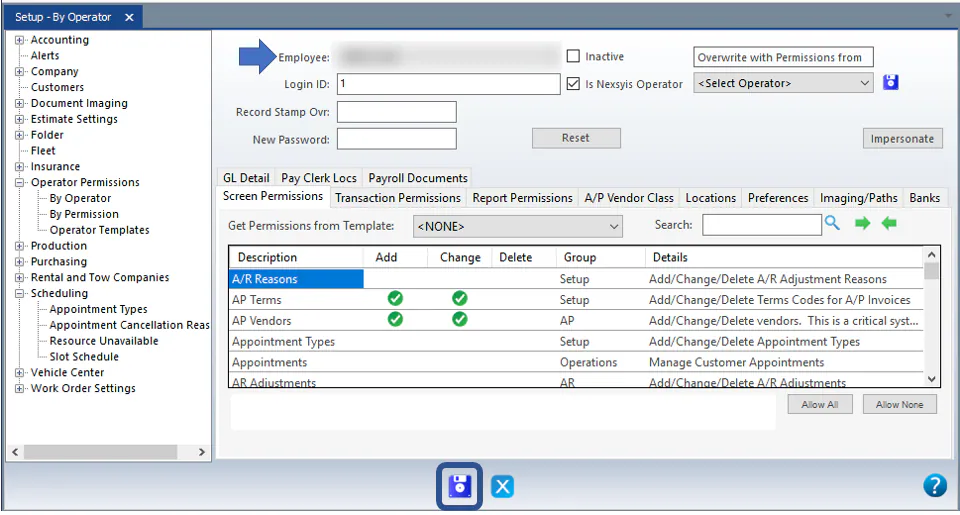
Select the employee from the Employee list at the top.
-
Add or remove permissions as needed, or choose a template from Get Permissions from Template.
-
If the new user works at a different location, change it on the Locations tab.
-
Select Save.
What happens next
Section titled “What happens next”The employee can now sign in with the Login ID shown on the record. The first time they sign in, they leave the password blank and follow the prompts to create a new password.