
Store vendor documents
Attach a vendor’s W-9 form, statements and contracts to the vendor record, so anyone who needs them can find them.
Attach a document to a vendor
Section titled “Attach a document to a vendor”-
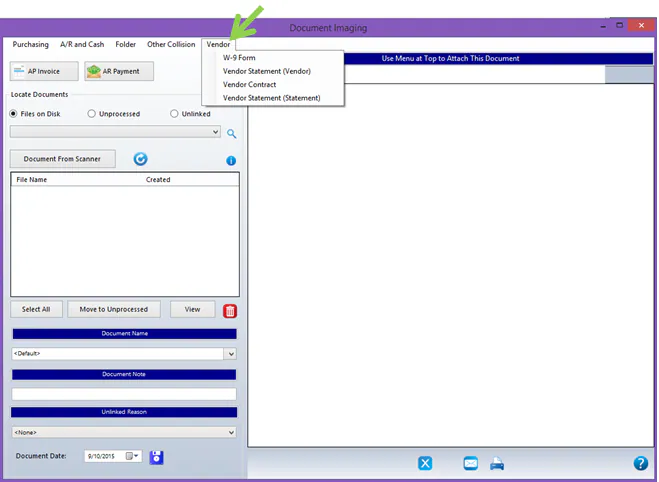
Open the scanned document in Document Imaging.
-
From the Vendor menu, select the document type:
- W-9 Form
- Vendor Statement (Vendor)
- Vendor Contract
- Vendor Statement (Statement): attaches the statement to the statement batch when you’re reconciling vendor statements.
-
The vendor search screen opens. Find the vendor and select Link at the bottom of the screen.
The document is attached to the vendor.
View a vendor’s documents
Section titled “View a vendor’s documents”-
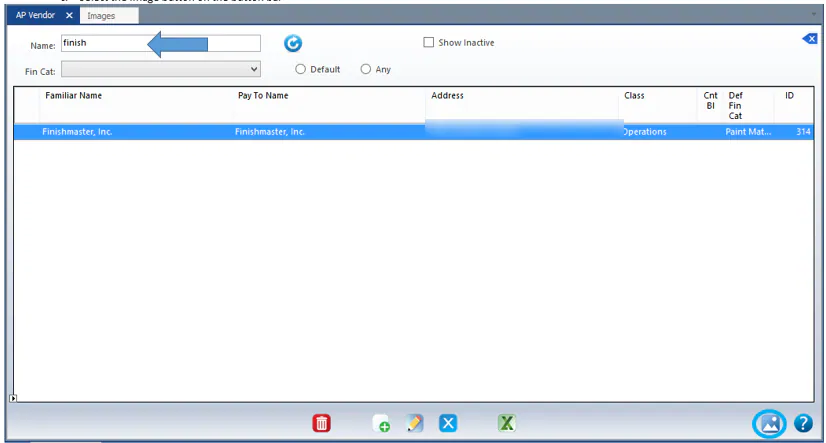
Select Operations › Vendors › AP Vendors.
-
Search for the vendor and select it.
-
Select the image button on the button bar.
-
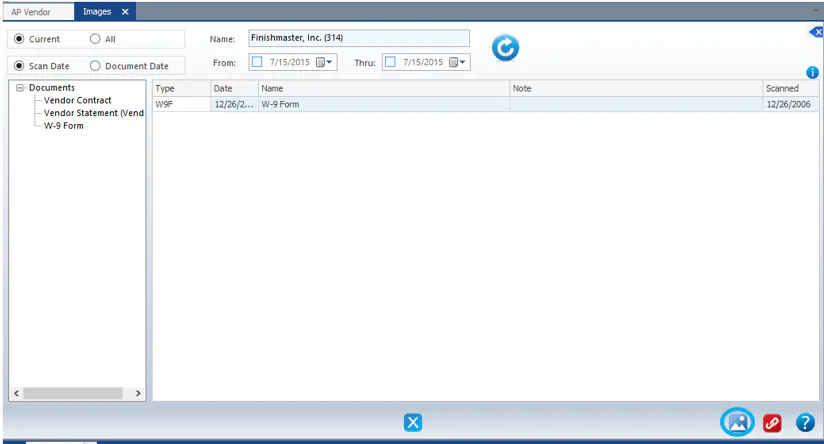
The vendor’s documents are listed by type. Select the image button again to view the selected document.
Add a note to a document
Section titled “Add a note to a document”In the document list, double-click in the Note column and type your note.
