
Choose the right Sales Analysis report
Nexsyis has two versions of the Sales Analysis report. They take the insurance company from different places, so a folder can appear under a different insurance company on each one.
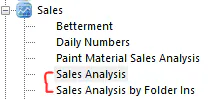
Which insurance company each report uses
Section titled “Which insurance company each report uses”| Report | Insurance company it uses |
|---|---|
| Sales Analysis | The insurance company on the estimate |
| Sales Analysis by Folder Ins | The insurance company on the folder |
Why a folder shows under the wrong insurance company
Section titled “Why a folder shows under the wrong insurance company”A common question is why Sales Analysis lists a folder under an insurance company when the folder is set to customer pay (no insurance).
This happens when the insurance company was set by hand on the folder, but wasn’t set on the estimate before the estimate was imported into Nexsyis. Sales Analysis uses the estimate’s insurance company, so it doesn’t match the folder.
Fix the insurance company on the estimate
Section titled “Fix the insurance company on the estimate”- In your estimating system, set the insurance company on the estimate.
- Import the estimate into Nexsyis again.
This is the only way to correct the insurance company that Sales Analysis uses.