
Set up sales codes and financial categories
Sales codes and financial categories are how Nexsyis tracks your work and reports on your business. This page explains the difference, what to decide when you add a new kind of work, and how taxability is set for each sales code.
How it works
Section titled “How it works”- Sales codes classify the work you do every day, such as labor, sublet, parts, scanning and calibration. They come from the estimate and can be changed by converting work order lines.
- Financial categories are the accounts on your financial statements. They roll up to your general ledger.
The two work together but are independent. You can organize your daily work one way and your financial reporting another way. One sales code can flow into one financial category, or several sales codes can flow into one financial category.
| Sales codes | Financial categories |
|---|---|
| How you organize your work | How you organize your reporting |
| Detailed, for example “Scanning and calibration labor”, “OEM sublet”, “Paint labor” | Summarized, for example “Revenue - Scanning and Calibration” or “Cost of Sublet” (one account for several sales codes) |
| Drive what shows on customer invoices and operational reports | Used by your accountant for financial statements |
When a folder is invoiced, revenue posts to the financial category each sales code is mapped to, and costs follow the same classification. Work recorded with a sales code flows to its financial category, then to the general ledger, then to your financial statements.
New financial categories don’t appear on your financial statements automatically. They need to be mapped to your statements. Nexsyis will help with this.
Add a new kind of work
Section titled “Add a new kind of work”If you’re adding work you’ve never tracked before, for example scanning and calibration:
- Decide what to call it. Talk to your team. What do you call this work day to day, and with customers? Should it be one code or several? Are labor and sublet combined or separate? Make sure the name matches the structure and naming style of your other codes.
- Decide which financial category it maps to. Is it a new account or an existing one?
- Ask Nexsyis Support to set up the sales code. Nexsyis will:
- create the sales code,
- create the financial category or map the code to an existing one,
- map it to the right line on your financial statements, and
- update your statement templates to include the new account.
Sales code taxability
Section titled “Sales code taxability”Nexsyis doesn’t calculate sales tax; the estimating system does. Nexsyis does point out possible tax issues, using the sales code taxable table to set what should be taxable in your state.
To see it, go to Setup › Company › Tax › Sales Codes. The screen is for information only.
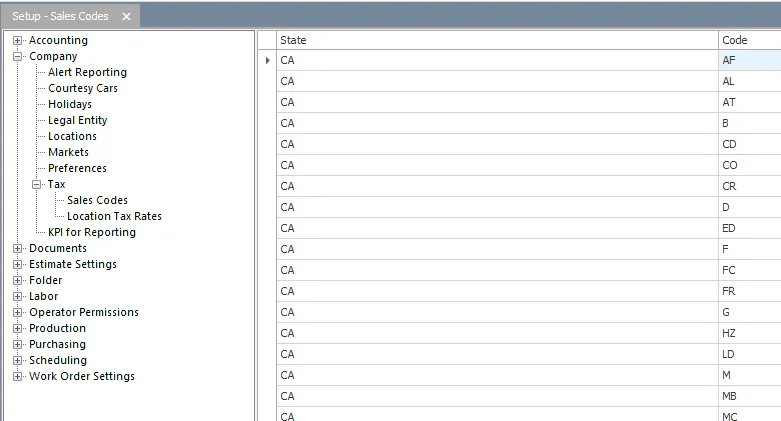
A Y in the Taxable column means the sales code is taxable. A blank means it isn’t.
To change the Taxable setting on a sales code, contact Nexsyis Support.