
Set work order line conversion options
Line conversion options are the conversions you choose from when you convert a work order line, such as Body Labor to Detail Labor. Each option sets which lines it can be used on and what the converted line becomes.
Create a line conversion option
Section titled “Create a line conversion option”-
Go to Setup › Work Order Settings › Line Conversion Options.
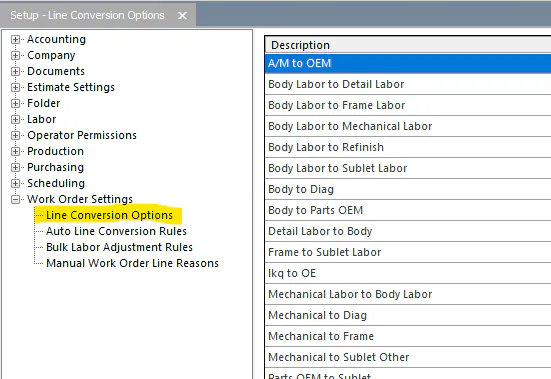
-
Select the new button (green +) at the bottom of the screen. To change an existing option instead, double-click it, or select it and then select the edit button at the bottom of the screen.
-
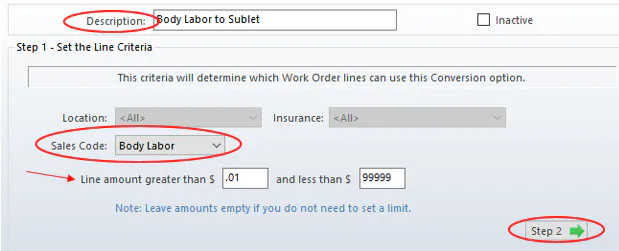
Under Step 1 - Set the Line Criteria, enter a Description.
-
Choose the original Sales Code of the lines this option converts.
-
Enter a minimum and maximum line amount in Line amount greater than $ and and less than $. Leave them empty if you don’t need a limit.
-
Select Step 2.
-
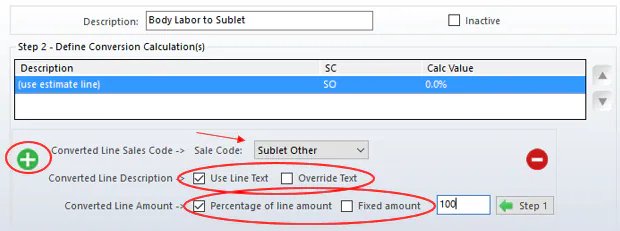
Under Step 2 - Define Conversion Calculation(s), select the green plus button.
-
In Sale Code, choose the new sales code.
-
For Converted Line Description, select Use Line Text to keep the original line text, or Override Text to type your own.
-
For Converted Line Amount, select Percentage of line amount or Fixed amount, and enter the value.
-
Select Save.