
Set up payroll accruals
When payroll is posted to the financial statements, three things decide where each amount goes: the financial category, the legal entity and the location. This page explains how each is set and how the payroll accrual entry is calculated.
Financial category
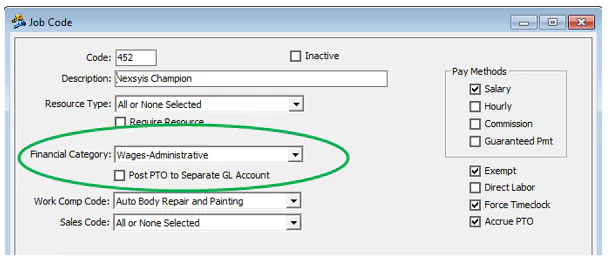
Section titled “Financial category”When a pay run is finalized, earnings post to the financial category set on the job code, unless the pay code overrides it.
- If no Financial Category is selected on the Pay Codes screen (A below), earnings use the one on the job code.
- If a financial category is selected on the pay code (B below), it overrides the job code.
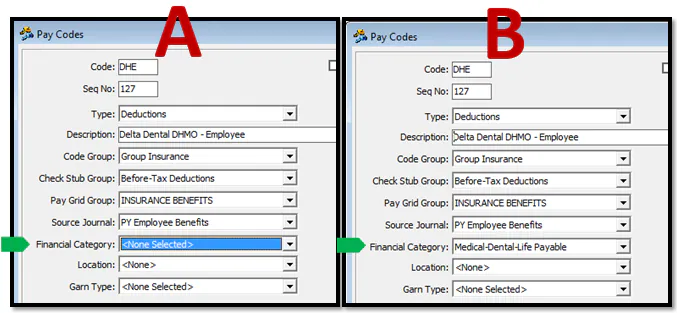
Every deduction and tax must have a financial category on its pay code.
PTO posts either to the financial category on the job code or to a separate account, depending on Post PTO to Separate GL Account on the job code. PTO posts to either a PTO wages account or Accrued PTO:
- Direct labor PTO posts to Accrued PTO.
- Overhead PTO posts to the salary or wage account on the job code.
Nexsyis Support sets up the PTO accrual.
Custom technician plans (incentive)
Section titled “Custom technician plans (incentive)”For technician incentive plans, use the inventory financial category. A preference setting controls whether direct labor is posted to inventory, overriding the financial category.
Legal entity and location
Section titled “Legal entity and location”The legal entity comes from the location: each location belongs to a legal entity.
Where a payroll amount is posted is decided first by the pay code, then by the job code on the employee’s Rate screen. If a company has more than one legal entity, the pay code location doesn’t apply, and the amount posts to the location on the job code.
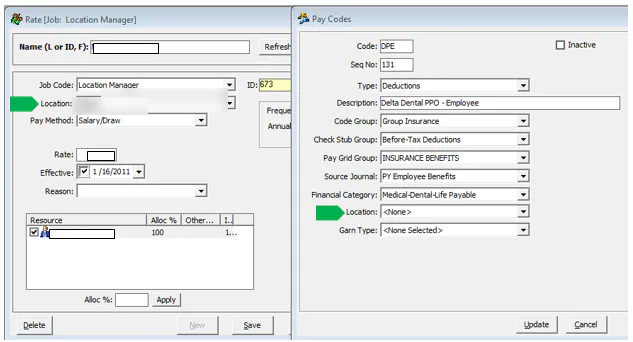
Exceptions:
- If a manager posts a manual adjustment to earnings, it posts to the location the manager enters, overriding the job code.
- On balance sheet accounts, the location is replaced by the legal entity.
Payroll journal entries
Section titled “Payroll journal entries”When a pay run is finalized, two journal entries are created:
- The pay run’s amounts are posted to each legal entity, location and financial category, with a credit to Accrued Payroll for the net pay on the period ending date.
- An automatic cash payment debits Accrued Payroll and credits Cash on the check date.
The accrual entry
Section titled “The accrual entry”When a pay period spans two months, part of the pay is accrued to the first month. For example, if a weekly pay period runs from Monday, May 30 to Sunday, June 5, two work days fall in May and three in June.
When you create the accrual, Nexsyis uses the number of days accrued for each pay run. An accrual is an estimate, so the formula is:
days in the prior month ÷ 5 (weekly pay run) or ÷ 10 (biweekly)
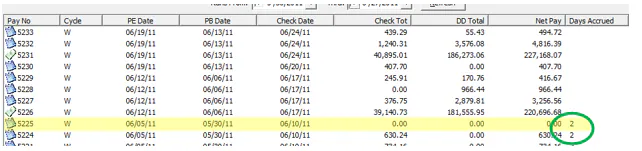
With two days in May, Nexsyis accrues 2/5 of the pay run as a reversing journal entry. For a $100,000 pay run:
- On the last day of the month (May 31), Nexsyis debits expense and credits Accounts Payable for $40,000.
- On the first day of the next month (June 1), Nexsyis reverses the accrual for the same amount.
Accrual by hours for direct labor
Section titled “Accrual by hours for direct labor”For direct labor, the accrual can use hours instead of days, when a preference setting is turned on:

Workers’ compensation accrual
Section titled “Workers’ compensation accrual”Workers’ compensation insurance owed is a function of pay. To set up the accrual, Nexsyis asks for your workers’ compensation policy information page and sets up a table with each code, description, rate, net rate, accrual rate and effective date.
Net rate = total estimated annual premium × rate ÷ total subject premium
Nexsyis debits workers’ compensation expense and credits workers’ compensation insurance. The accrual rate should equal the net rate, but you can set it higher if you want extra set aside.
Automatic PTO accrual
Section titled “Automatic PTO accrual”On every pay run, Nexsyis multiplies the PTO earned by the PTO rate, then debits expense and credits Accrued PTO.