Set up follow-up templates
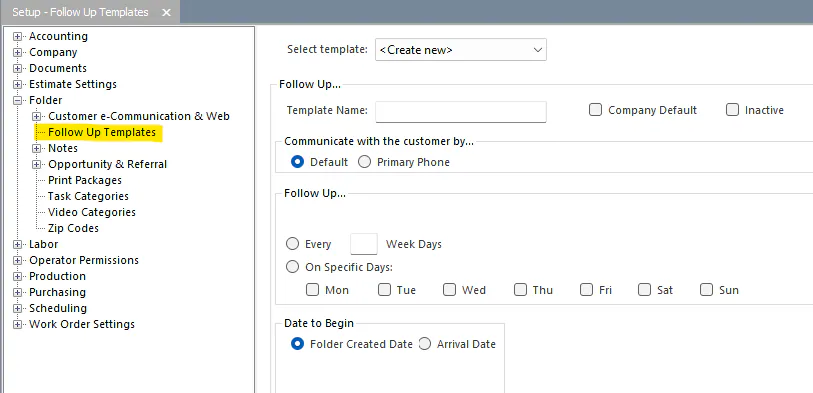
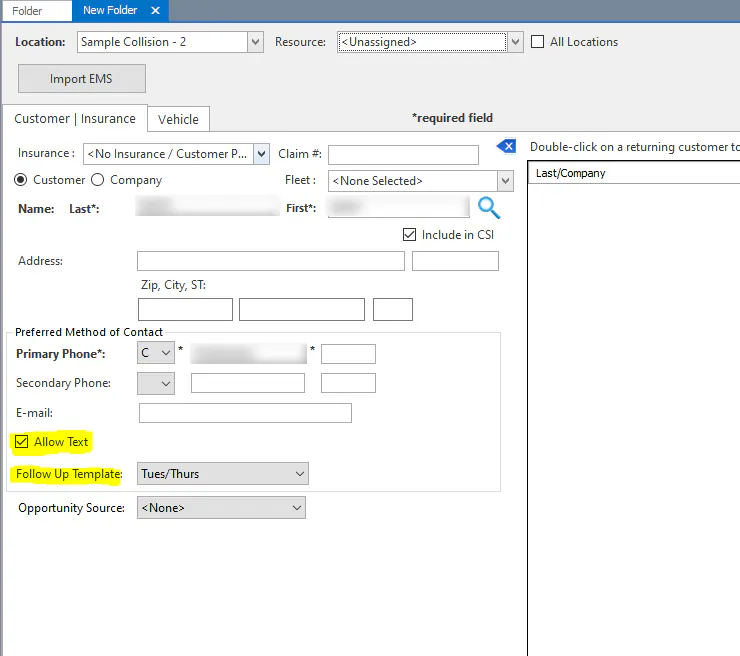
A follow-up template creates a folder’s follow-ups automatically. When you create a folder and choose a template, the follow-up is set up straight away. One template can be the company default, which is filled in on the Create New Folder screen.
How the contact method is chosen
Section titled “How the contact method is chosen”- If the customer has a cell phone number, the follow-up is a text. Allow Text must be selected.
- If there’s no cell phone number, it’s an email.
- If there’s no email address, it’s a phone call to the primary phone number.
Create a follow-up template
Section titled “Create a follow-up template”- Go to Setup › Folder › Follow Up Templates.
- Leave the list set to <Create new>.
- Enter a name.
- To fill this template in on every new folder, select Company Default. Only one template can be the default.
- Choose how often to follow up: every so many week days, or on specific days.
- Choose the Date to Begin:
- Arrival Date: nothing is scheduled until the folder is marked as arrived. The first follow-up is created then.
- Created Date: the first follow-up is created when the new folder is saved.
- Select Save.