
Assignments for FNOL in Nexsyis
Released September 24, 2026
Assignment emails from insurance companies can now be sent directly into Nexsyis and NexsyisNow, automatically creating and updating folders the moment a job comes in. This improves your folder capture rate and eliminates manual data entry.
New assignments
Section titled “New assignments”-
Folder created from the assignment email details. The folder appears on the Opportunities tab with a Created by user of “WEB”.
-
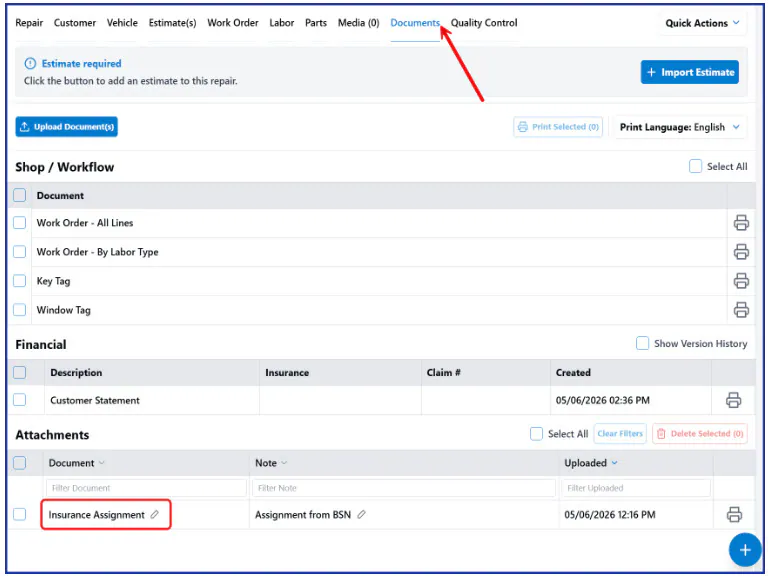
Attachment of the assignment email is uploaded to the folder documents.

-
Notification of the new assignment shows up in the message center for users, as well as in the emails configured on the location tab.
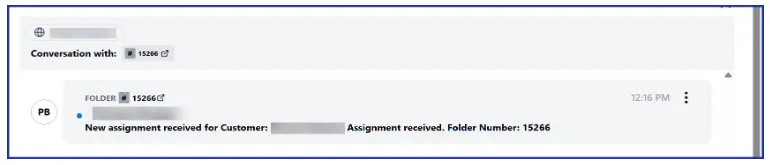
-
Texts the customer automatically, if auto opt-in is enabled and a messaging template is set up.

Assignment updates
Section titled “Assignment updates”-
Task is assigned to the Sales or Service Resource, with the update from the email set as the task description.
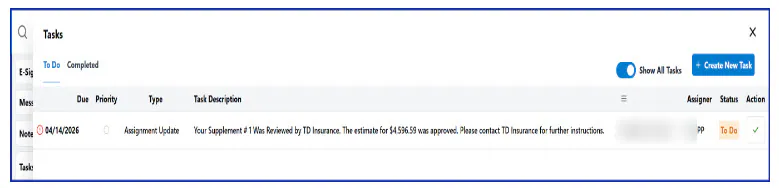
-
Attachment of the assignment email is uploaded to the folder documents.
Processing failures
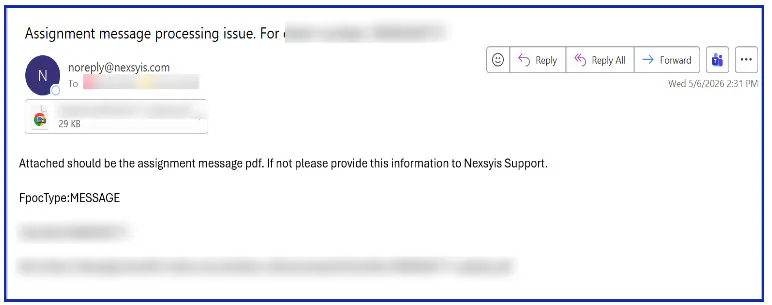
Section titled “Processing failures”- Failure notification emails are sent to the email addresses in your shop’s location setup whenever an assignment has a processing issue.
- Claim number included: the alert contains the claim number so you can identify the job at a glance.
- Original assignment attached: the failed assignment is included as an attachment.
Set it up
Section titled “Set it up”To set up this feature, your IT team needs to automatically forward emails from the assignment inbox to assignments@nexsyiscollision.com. If you are an MSO, each location must have its own unique email address. Nexsyis uses the name in the email address to assign the folder location.
Once email forwarding is set up, contact Nexsyis Support at nexsupport@nexsyis.com. We’ll monitor for the assignments and finish setup on our end. Different actions occur depending on whether the forwarded email is a new assignment or an assignment update.
For the full documentation and setup details, see Assignments in Nexsyis.