Set an operator's EMS path
Nexsyis imports Mitchell and Audatex (Qapter) estimates from EMS files in a folder on your computer or network. Your shop has a default EMS path. Add an operator EMS path only when a user needs another path, different from the shop’s.
Before you begin: set up your shop’s default EMS path first. See Set up estimate imports.
Add an operator EMS path
Section titled “Add an operator EMS path”-
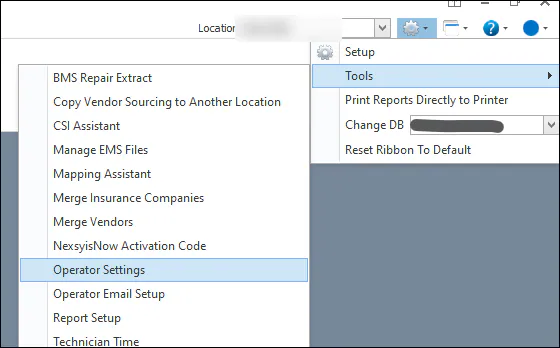
Select the gear icon, then Tools › Operator Settings.
-
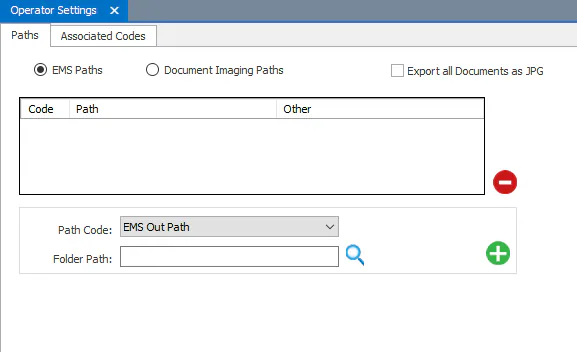
On the Paths tab, select EMS Paths.
-
In Path Code, choose the type of path:
- EMS Out Path: to import estimates from an estimating system.
- EMS In Path: to export to an estimating system (CCC only).
-
In Folder Path, paste the path, or select the magnifying glass to browse to it.
-
Select the green plus button to add the path.
-
Add any other paths the same way, then select Save.
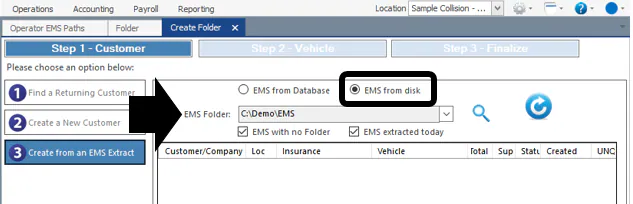
The user’s paths now show by default when they select EMS from disk while creating a folder from an estimate file.