
Use the Marketing dashboard
The Marketing dashboard in NexsyisNow shows how many opportunities each resource turns into repairs, where your arrived repairs come from, and what customers request online.
Before you begin
Section titled “Before you begin”You need the Allow access to the Marketing Dashboard transaction permission.
Open the dashboard
Section titled “Open the dashboard”- In NexsyisNow, select the dashboard icon in the left menu.
- Select the Marketing tab.
- Choose a time frame: Today, This Week, This Month or This Year.
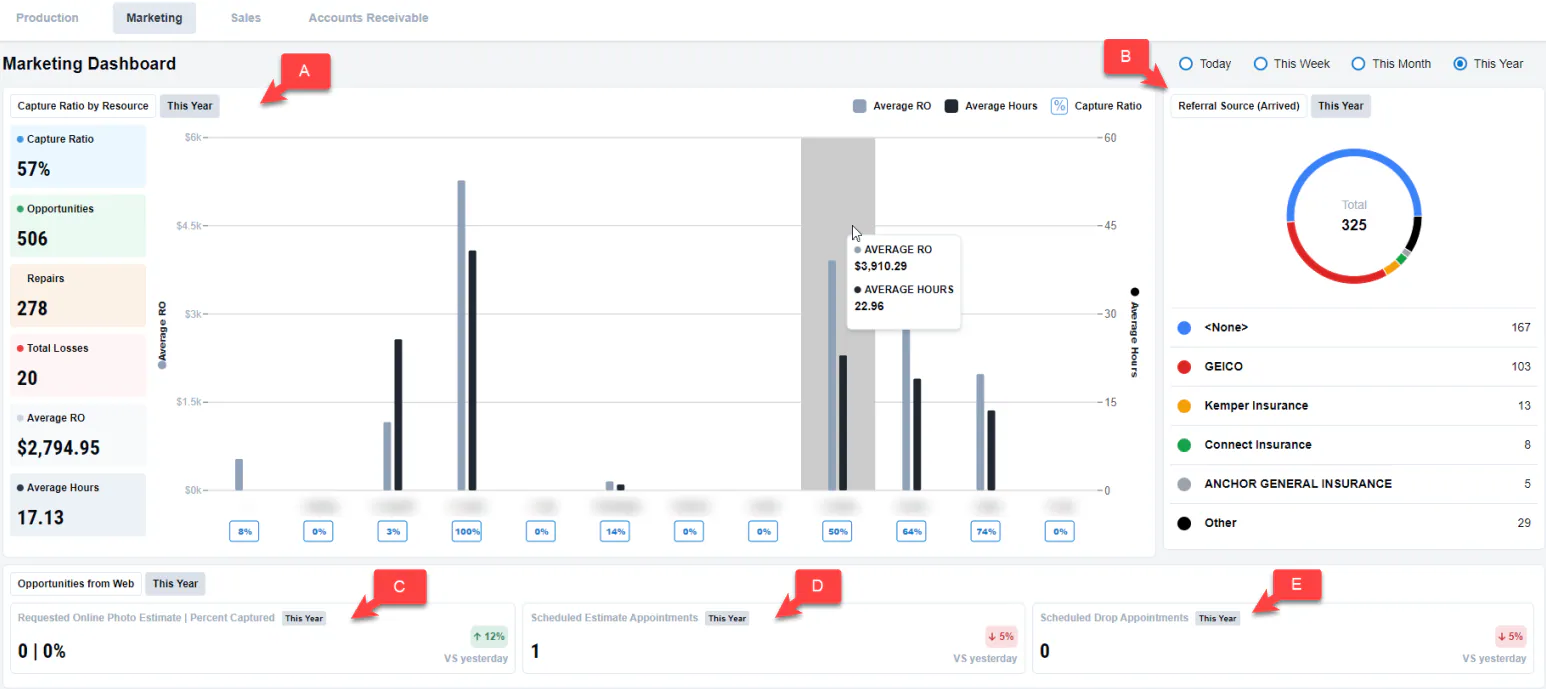
What the dashboard shows
Section titled “What the dashboard shows”- A. Capture Ratio by Resource: repairs captured by each resource, with the average RO in dollars and average hours per repair. Hover over the chart to see the numbers.
- B. Referral Source (Arrived): the referral sources of arrived repairs.
The Opportunities from Web cards apply only if you use online scheduling and online photo estimates:
- C. Requested Online Photo Estimate | Percent Captured: online photo estimates requested, and the percentage captured.
- D. Scheduled Estimate Appointments: estimate appointments scheduled online.
- E. Scheduled Drop Appointments: drop appointments scheduled online.