
Convert to CCC Secure Share imports
With CCC Secure Share, CCC sends an estimate to Nexsyis when you save it. You don’t need to export EMS files or browse to a path to import.
Turn on Secure Share in CCC
Section titled “Turn on Secure Share in CCC”- Add Nexsyis as an app in CCC Secure Share. CCC’s instructions are in How to Enable Apps for Secure Share. See also Set up estimate imports.
- Email nexsupport@nexsyis.com to let Nexsyis Support know. Support finishes the setup in Nexsyis.
Send an estimate to Nexsyis
Section titled “Send an estimate to Nexsyis”-
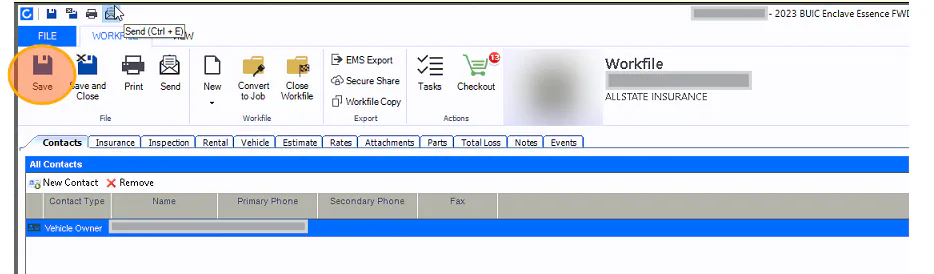
In CCC, select Save on the estimate. CCC sends the estimate to Nexsyis through Secure Share. You don’t need to select EMS Export.
-
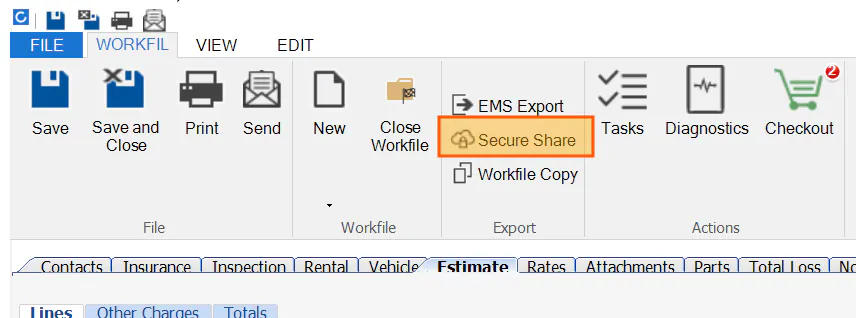
If the updated estimate still doesn’t show in Nexsyis, select Secure Share.
-
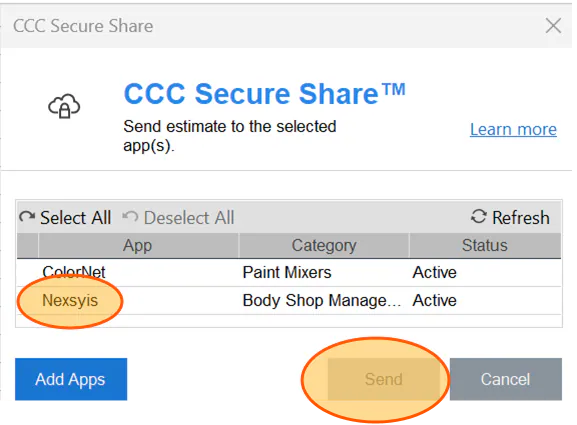
Select Nexsyis, then select Send.
Import a new estimate into Nexsyis
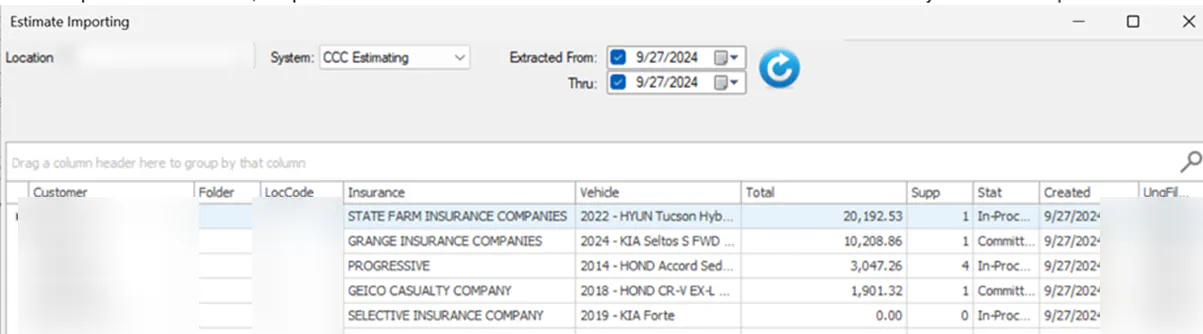
Section titled “Import a new estimate into Nexsyis”On the Estimate Importing screen, the path box no longer shows. Estimates saved in CCC show on the screen automatically, so you don’t need to browse to a path.
For the full import steps, see Import an estimate.
Choose how supplements import
Section titled “Choose how supplements import”There are three company-wide options for importing supplements:
- Don’t import supplements automatically. After saving the supplement in CCC, users select Re-Import Estimate in Nexsyis to import it.
- Import locked supplements automatically. Nexsyis re-imports each locked supplement saved in CCC.
- Import all supplements automatically. Nexsyis re-imports every supplement saved in CCC.
To change how supplements import, contact Nexsyis Support.
With options 2 and 3, users don’t need to select Re-Import Estimate. Check the LastUpdate column on the folder’s Estimates tab for the latest update. It should change within seconds of selecting Save in CCC.
