
Convert prior flag hours
If you’ve already paid technicians for hours on repairs that are still in progress at go-live, enter those hours in Nexsyis as prior flags. Nexsyis then knows those hours have been paid.
Before you begin
Section titled “Before you begin”- Contact Nexsyis Support at nexsupport@nexsyis.com with the pay period to use for prior flags. Nexsyis Support sets that date in your location settings. After that, you can enter and edit prior flags.
- You need the transaction permission Entry of prior system labor flags.
Add prior flags
Section titled “Add prior flags”-
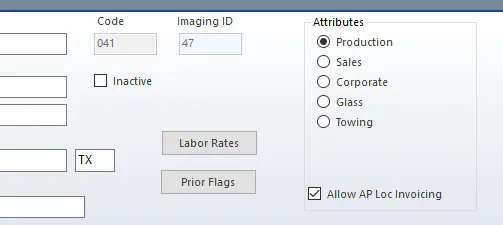
Select Settings › Setup › Company › Locations, then select the location.
-
Select Prior Flags.
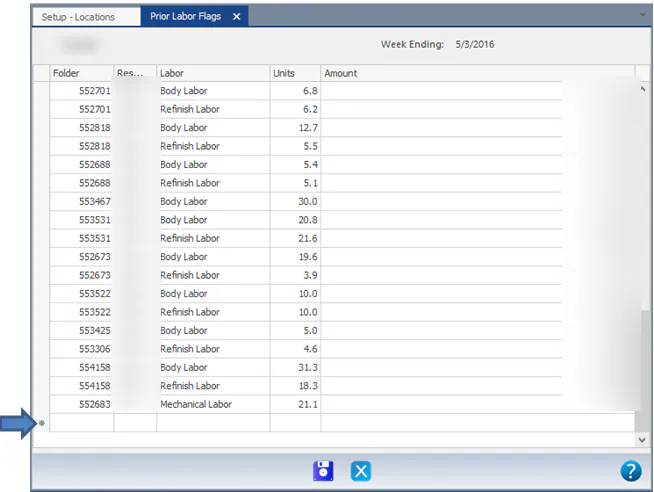
The Prior Labor Flags screen opens with the location and week ending date at the top. Any prior flags you’ve already entered are listed.
-
Go to the blank row at the bottom of the grid and enter:
- Folder
- Resource
- Labor
- Units
-
Press Enter. Amount fills in automatically, and a new blank row appears.
-
Repeat for each folder and technician. You can also change existing rows.
-
Select Save. Nexsyis creates or updates all the flags in the grid.
If you find a mistake later, open this screen again, correct the row, and select Save.