
Track employee time in Nexsyis
The Payroll tab lets you track employee time without leaving Nexsyis. Employees clock in and out, managers correct punches, and managers approve each employee’s time.
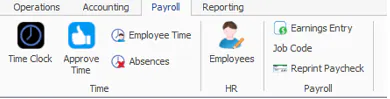
Time screens
Section titled “Time screens”- Time Clock: employees clock in and out, and see their hours for the current or prior week. Nexsyis records whether each punch was made from inside Nexsyis or from the separate Time Clock application. See Use the time clock.
- Approve Time: managers with permission review and approve employees’ time. See Approve time.
- Employee Time: managers with permission view, add and edit an employee’s punches. See View and edit employee time.
- Absences: managers with permission enter an absence record for an employee. See Record an absence.
HR screens
Section titled “HR screens”- Employees: managers with permission change basic employee details such as name, status, employment location and supervisor. See Add a new employee.
How it fits together
Section titled “How it fits together”- Set up each employee to use the time clock.
- Set who can approve each employee’s time and absences.
- Employees clock in and out each day.
- Managers correct missing punches and approve time.