
Post payroll to the general ledger
Nexsyis doesn’t connect directly to payroll providers such as ADP, Paychex, Paylocity, Gusto or BambooHR, so you post each payroll to the general ledger yourself. There are two ways to do it: a manual journal entry or a GL import. Before you choose, decide whether you need employee-level detail or one payroll total in your general ledger.
Before you begin
Section titled “Before you begin”- Get the right reports. A payroll register or check summary often shows only the employee side: gross pay, withholdings and net pay. You also need the employer liability report, which shows employer-paid taxes (such as the FICA match and unemployment) and employer-paid benefits. Without it, your payroll tax expense will be too low.
- Make sure you can get to the reports. Ask your payroll provider for access to its payroll reporting, so you can pull the same reports every pay period.
- Know your financial categories. Decide before your first payroll entry which financial category each type of pay goes to, for example office wages, estimator wages, technician labor, PTO and bonus, payroll taxes, health and dental insurance, and 401(k).
Choose a method
Section titled “Choose a method”| Manual journal entry | GL import | |
|---|---|---|
| What the GL shows | One line per account, for example “Payroll 04/16 - Gross Wages: $1,430” | Each employee on a separate line, for example “Chris Example - Regular Pay: $800” and “Pat Example - Regular Pay: $630” |
| Pay types | Can’t separate pay types | Separates regular, overtime, bonus and other pay types |
| Ref No, Source Name and Description | One description shared by all lines | Set for each line |
| Effort | Quick and familiar | Takes longer; the spreadsheet must be formatted to Nexsyis requirements |
| Best for | Payroll totals | Detailed payroll reporting and checking payroll accuracy |
Manual journal entry
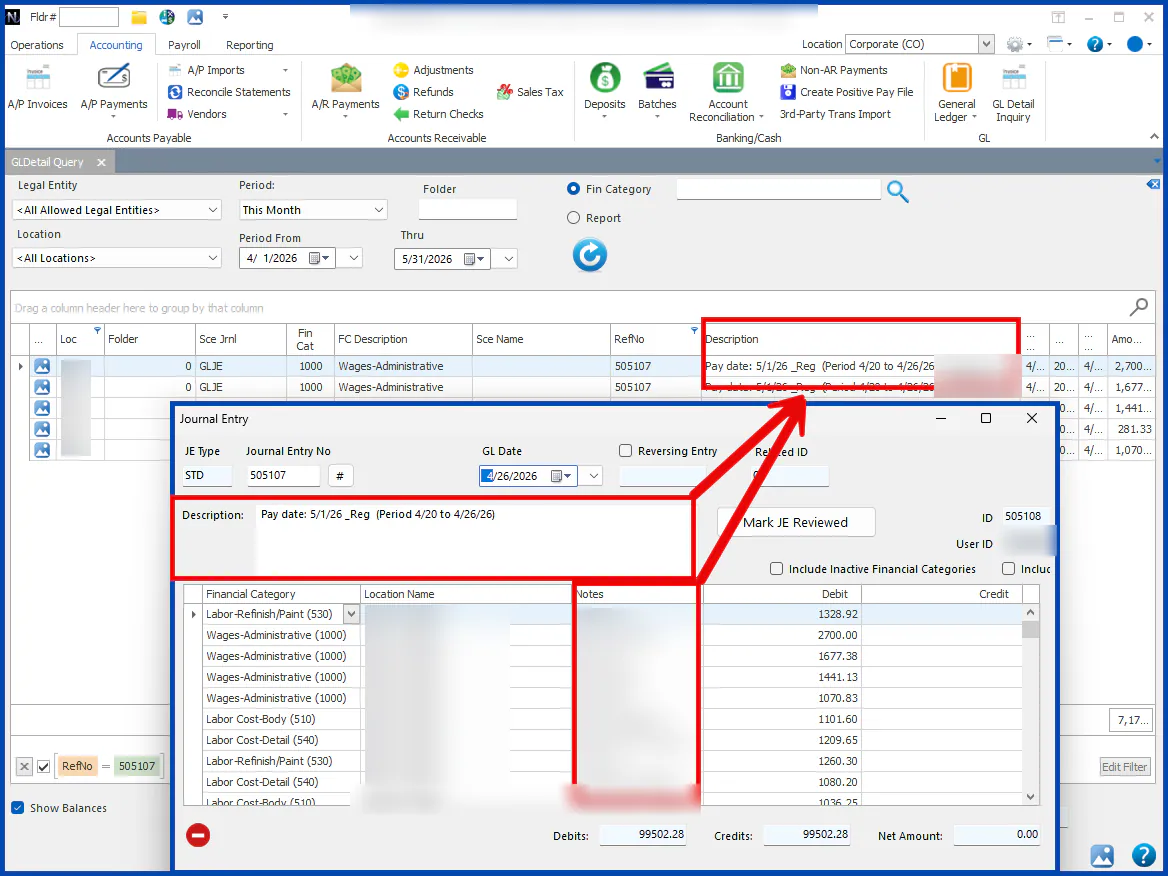
Section titled “Manual journal entry”A journal entry has one journal entry number and a general description, for example “Wages - Payroll Paydate: 5/3/2025 - $15,000.00”. The description you see in the general ledger combines the Description box and the line Notes on the journal entry. Because all lines share the same description, use a journal entry for payroll totals. It can’t break down pay types or show individual employees.
GL import
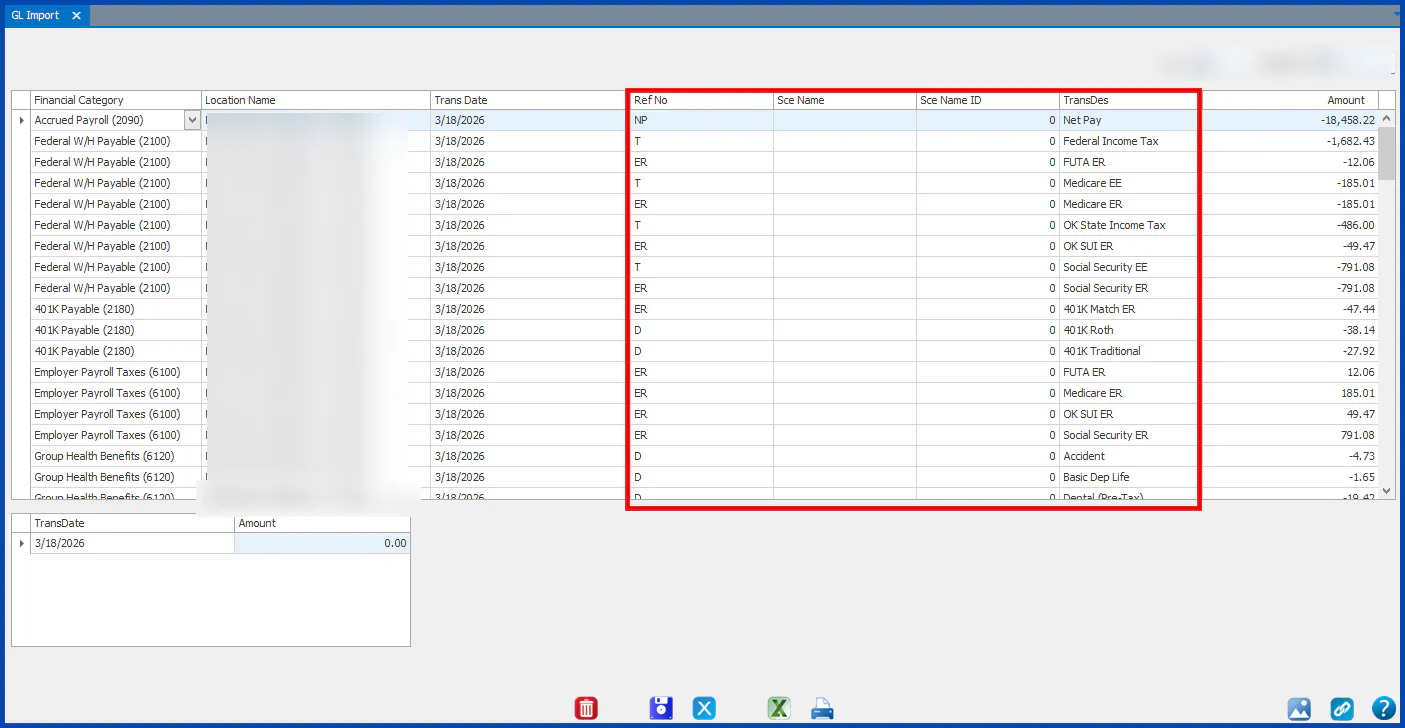
Section titled “GL import”Export your payroll data from your payroll provider to Excel. Reformat the spreadsheet to match Nexsyis requirements, then upload it on the GL Import screen (Accounting › General Ledger › GL Import). Each employee and pay type is posted on its own line, and you can set the Ref No, Source Name and Description for each line. For the formatting requirements, contact Nexsyis Support at nexsupport@nexsyis.com.
Post the payroll
Section titled “Post the payroll”- Pull the employee-side and employer-side payroll reports for the pay date.
- Choose your method: a manual journal entry for totals, or a GL import for detail by employee and pay type.
- Post production and technician wages to your labor cost of sales financial categories, not to office wages.
- Post employer taxes, benefits and 401(k) to their own financial categories. If you report by location, split wages by location.
- Check that the entry balances, then review your income statement for the month.
Switching payroll providers
Section titled “Switching payroll providers”- Your new provider’s reports will look different. Send Nexsyis Support a sample of both the employee and employer reports from your first payroll, and they can help you map them to your financial categories.
- Compare your first month with the new provider against earlier months. If wages jump or drop sharply for a location or department, or a category such as estimators or PTO is empty, the mapping probably needs adjusting.
- If Nexsyis previously ran your payroll, Nexsyis Support can provide copies of past quarterly filing reports for your new provider.
When to contact Nexsyis Support
Section titled “When to contact Nexsyis Support”- You’d like a walkthrough the first time you post a new provider’s payroll. Have your payroll provider login ready.
- You need the GL import formatting requirements.
- Labor cost of sales, payroll taxes or benefits look wrong on your financial statements.